
PPC for Excavation and Septic Business
Search Advertising
In this chapter, we’ll discuss paid marketing strategies, when you should use each type for your business, and the strategies for success that are working in the current market.
Before we dig in, let’s discuss why you would want to use paid advertising. I know it can be painful to pay a giant tech company for leads. It feels impersonal, expensive, and like you are creating a dependency you’ll never be able to shake.
As a business owner who pays for advertising myself, I understand the risk. But like any born business owner, I know a good bet when I see it and the pay off is worth it!
I got a call from a client yesterday and he said, “You’re my new best friend, I’ve closed $10,000 in business in the past few days from these Google Ads! I’m kicking myself because of all the money I’ve missed out on over the years from not doing this.” He had been burned by a marketing company before, and was really hesitant to try again. But with the right strategy, paid advertising can become a money printing machine. When you put in $300 and get back $10,000, you’ll never look down at paid advertising again.
But if you’re paying more for advertising than you’re making, that’s a crappy place to be. Let’s discuss today’s current strategies to make sure your paid advertising is a money printing machine, and not a money sink hole.
Return on Investment
ROI, also known as return on investment, is the ratio at which you make money off your paid advertising. This is the gold standard every site prep company or agency should aim for. After the initial 2-3 month optimization period in your ad account, your return on investment should be at least 1:3 or greater.
Because return on investment is so important, we don’t run Facebook ads for our clients. We’ve thoroughly tested it with the very best strategies and the leads are typically poor quality and high cost.
Today’s Strategies
Digital marketing is always changing, so it’s important to make decisions based on current strategies, and not outdated advice or experience that will no longer produce results.
The biggest recent shifts are the way data privacy is handled and affects advertising, and the sophistication of machine learning in the advertising platforms. With updates to smartphone privacy protections, most of the detailed targeting options advertisers had are now either no longer available, or minimally effective.
I still have clients that want to get involved in micromanaging targeting specific audiences, and it simply doesn’t work like it once did. Because of privacy issues, platforms like Google and Microsoft Advertising no longer share micro audience data, but that doesn’t mean we can’t still use that data, we just have to trust Google and Microsoft Advertising to do it.
What works in today’s advertising world is to trust the machine, but with human boundaries. We want to share specific control with the advertising platforms but also customize certain aspects. Both completely manual, or completely Google/Microsoft controlled campaigns can really struggle. The campaigns that do the very best are those that have the man and the machine working together.
We’ll get into more detail of what this looks like in each platform, but first let’s discuss when you should use which type of platform for your business.
Local Service Ads
If you remember from Chapter 2 on understanding the search results, the first result on the search page is Google’s Local Service Ads. These are a great option in very specific circumstances only. Local Service ads work great if:
- You have a local service based business like septic installation or pumping, or you do small scale tree removal or excavation that would fit in the landscaping category.
- You have a verified Google Business Profile with a good amount of reviews in comparison to your competitors.
- You want local, residential or small scale jobs in about a 30 to 45 miles radius of where your Google Business Profile is located.
If your business doesn’t have a local service component, don’t worry about Local Service Ads. If your business does have a local service offering, but you don’t have great reviews in comparison to your local competitors, you can qualify for Local Services, but in my experience with clients, you will get very few calls.
Local Service Ads work great though if you do have a local service with a competitive amount of reviews. We have septic pumping companies getting calls for as low as $20/call and between 80-100 calls per month with Local Service Ads. There is a big variation depending on your location, population density, and competition.
Local Service Ads work on a pay-per-call basis, where you supposedly only pay for legitimate calls from someone ready to book service. This works with a Google swapping number that records the calls sent to you, and has AI analyze them to determine if they are legitimate calls or not.
In our agency experience, this works correctly about half the time! You sometimes pay for calls that are not legitimate calls, and you sometimes don’t pay for real calls either. It usually works out in the end, but we suggest having someone regularly listening to the calls and submitting ratings back to Google, which will often give the account a refund on charged calls that weren’t good calls.
If you turn on Local Service Ads, it’s also very important that you answer your phone most of the time. You can set business hours in the settings, but if Google sees that you’re not answering the leads they send, they will show your profile less.
The Pay-Per-Click Networks
While Local Service Ads are pay-per-call, Google and Microsoft ads are pay-per-click (PPC).
An estimated 80% of searches are done on Google, making it the most popular search network and the most powerful paid advertising strategy for site prep companies. Most of the remaining searches are done through Microsoft’s search network primarily on Bing.
We’ve found great success with both Google and Microsoft PPC for our clients! We generally start with Google, and add Microsoft when the client has maxed out their budget/geo area and needs to expand. In general, most of the strategy that applies to Google, also applies to Microsoft as the platform and auctions are very similar.
Why Most Excavation Ads “Miss the Mark”
In the dirt world, you wouldn’t use a mini-ex to dig a multi-acre pond. You use the right tool for the specific job. Unfortunately, most excavation companies set up their Google Ads like they only own one bucket.
The “One-Size-Fits-All” Mistake
The biggest mistake contractors make is bundling all their services—septic installs, land clearing, foundation digging, and pond construction—into a single Campaign.
When you do this, you end up showing the same generic ad to everyone. If a homeowner types in “emergency septic repair,” and your ad pops up talking about “General Excavation & Land Clearing,” they are likely to skip over you. They want a specialist for their specific problem, not a jack-of-all-trades who might get to them next week.
The Homepage Trap
Even worse, many contractors send every single click to their homepage.
- If a customer searches for “driveway grading,” they shouldn’t land on a page that spends three paragraphs talking about your fleet of dump trucks and your company history.
- They should land on a page dedicated to Driveway Grading, showing your past work and a clear way to get an estimate.
When your ad doesn’t match the search, and your webpage doesn’t match the ad, Google punishes you. Not only will you fail to convert leads, but Google will actually charge you more per click because your “relevance” is low. You’re essentially paying a “laziness tax.”
The Missing “Call to Action”
The final reason these campaigns fail is that once a lead finally lands on your site, they don’t know what to do. You’ve just paid $10.00, $15.00, or even $30.00 for that one click—only for them to see a page with no clear instructions.
If your page doesn’t have a strong Call to Action (CTA)—like a “Click to Call” button or a “Get a Free Site Quote” form—that potential customer is going to hit the “back” button and call the next guy on the list. You just handed your competitor a lead that you paid for.
By avoiding these “rookie” setup errors—grouping your services correctly, using dedicated website pages, and telling the customer exactly how to hire you—you’ll stop burning your marketing budget and start winning the high-margin jobs.
Inside the Google Ads Auction: Why
Relevancy Trumps the High Bid
Understanding the Google Ads auction is the “secret sauce” for excavation and septic contractors. Many guys in the industry think it’s a simple case of whoever has the biggest checkbook wins the top spot. But that isn’t how it works.
The reality is that Google’s entire business depends on relevancy. If someone searches for “septic tank pumping” and Google shows them ads for “landscaping” or “swimming pool installers,” that person will stop using Google. To protect their 80% market share, Google built a system that rewards the most helpful result, not just the most expensive one. This is where the Quality Score comes in.
The BMW vs. Mercedes Rule (Contractor Edition)
Imagine a homeowner types in “Caterpillar Excavator Rental.” A local excavation company might think, “Hey, that person needs dirt moved. I’ll bid on that keyword!” The excavation company might offer Google $15.00 per click. Meanwhile, a local Cat Rental Store only offers $2.00 per click. Even though the contractor is offering way more money, Google will likely show the Rental Store in the #1 spot. Why? Because the user asked for a rental, not a contractor. Google rewards the Rental Store with a high Quality Score because they are exactly what the customer is looking for.
The 3 Pillars of Your Quality Score
Google calculates your score based on three core components. If you nail these, you can outrank the “big guys” while paying half the price per click.
- Click-Through Rate (CTR): This is the percentage of people who see your ad and actually click it. If 100 people see your ad for “road excavation” and 10 of them click it, you have a 10% CTR. Google loves this—it means your ad is “compelling.” The higher your CTR, the more Google trusts you, and the less you have to pay.
- Ad Relevance: Does your ad match the keyword?The Wrong Way: Someone searches for “septic line repair” and your ad says: “We do all types of dirt work and hauling.”
- The Right Way: The ad says: “Expert Septic Line Repair – Fast Estimates & Licensed Pros.” Google sees the second ad as much more applicable and gives you a higher score.
- Landing Page Experience: This is what happens after the click. If your ad promises “Land Clearing Services” but the link sends them to a homepage that only talks about “Tree Removal,” the user is going to hit the “Back” button immediately. Google tracks this “bounce.” If people leave your site quickly, it tells Google your page wasn’t relevant, and they will tank your Quality Score and jack up your prices.
The Bottom Line
If your ads are specific, your headlines match your keywords, and your website gives the customer exactly what they asked for, you win. You’ll get better leads, a higher position on the page, and a lower bill from Google at the end of the month.
Understanding Keywords and Search Results
The very best PPC ads work when you show the right ad to the right person at the right time. One of the first ways we stay relevant in the auction is through keywords.
You get to set the keywords you want your ad to show up for when someone searches that keyword. When they see your ad and it’s a match for what they’re looking for and they click on your ad, then you pay for that click.
Whether or not they become a lead (which we define as a phone call or website form submitted) depends on how accurate your keyword is compared to their search intent, if your ad makes you stand out above your competition, and what their experience is like on your website.
Let me explain how keywords work in greater detail. There are three types of keywords in PPC ads. Broad match, phrase match, and exact match. Here is how Google defines each of the keyword types:
Broad match: Ads may show on searches that relate to your keyword.
Phrase match: Ads may show for searches that include the meaning of your keywords.
Exact match: Ads may show on searches that have the same meaning as your keyword.
Broad match will get you the cheapest cost-per-click, but also usually the lowest conversion rate (but not always!). This means in the end you will pay more for a broad match lead, even if your CPC is lower. In some cases, we have seen broad match work well because it gives Google machine learning lots of control to optimize. But in most cases when we look at the actual search terms, they’re not a good match for our clients services and we end up way over paying for leads.
In campaigns we typically use phrase and exact match to start and give it about 6-8 weeks to see how they are converting. After about 8 weeks, we may prune some non-converting keywords. Once we’ve reached the 3 month mark we get a very clear picture of how the different types of keywords are converting and can make data driven decisions about which keywords to keep active.
The best way to understand how your different match types are doing is to weekly look at the search terms. This will show you exactly what words people are typing in when your ad shows up and which keywords and phrase types are triggering those searches. Your weekly search term check is also a great time to add any negative keywords to the account or campaign that you know are definitely not a good fit.
The Anatomy of a Great Ad
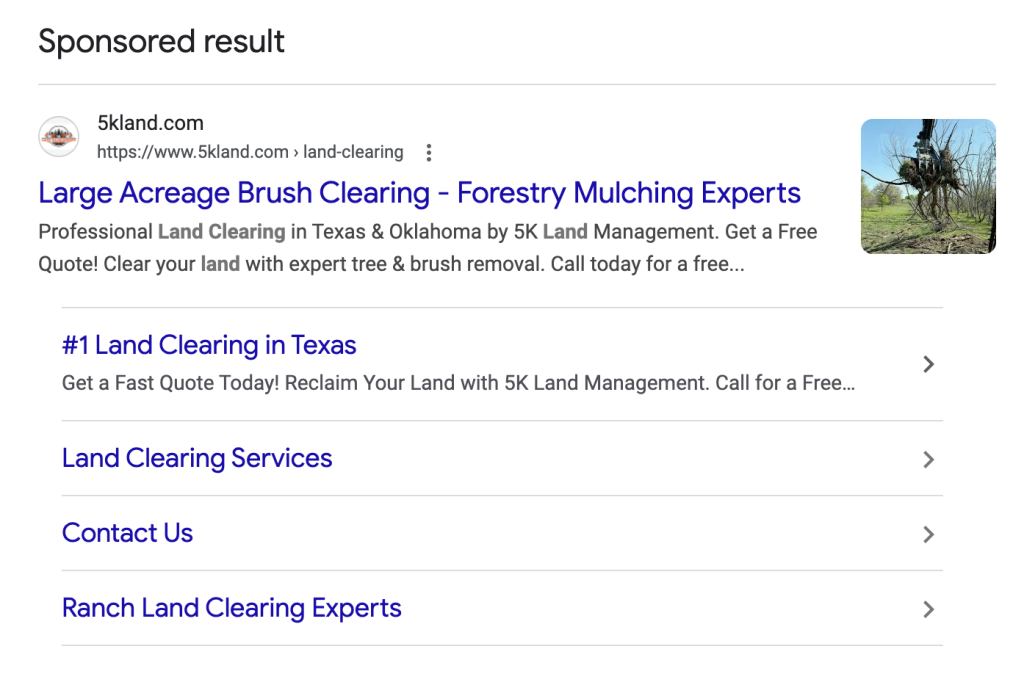
When customers search, your ad will look like a website but say “sponsored result.” It should include pictures, your logo and business name, and site links to other pages on your website.
Writing a winning ad starts with a “quality over quantity” mindset. We utilize up to seven distinct and unique headlines to give Google’s AI enough variety to test what actually converts. By focusing on diversity, we can highlight different unique selling points in each version—such as “Licensed & Insured” in one and “Free Site Estimates” in another. We also leverage Dynamic Keyword Insertion, like {KeyWord:Septic Installation}, to ensure that if a customer searches for a specific service or location, our ad mirrors their exact language. This alignment between the search term, the ad, and the landing page content is what drives down your costs and boosts your ranking in the ad auction.
Strategy, Testing, and the Power of the “Pin”
To turn clicks into actual jobs, every ad must lead with a strong call to action and be backed by numbers and statistics, such as “20+ Years Experience” or “Same-Day Quotes.” While we let Google test different combinations, we use pinning sparingly to ensure your most critical benefits—like “Emergency Septic Repair”—always stay front and center. By combining these key features with strategic keyword placement in the headlines and descriptions, we create ads that don’t just sit at the top of the page but actually get the phone to ring with high-value leads.
Bidding Strategies that Win Jobs
Though manual bidding can still work especially if you use it when starting a new account, we’ve found that allowing Google or Microsoft to use automated bidding tends to yield better results especially over time. Max Conversions with no target cost per acquisition set, with solid conversion tracking setup, gets us the best result.
An important note about paid advertising on Google and Microsoft, is that they are based on machine learning that is sensitive to change. Every time you make a change to the account, even if it’s for the good, you reset the machine learning that’s making your ad account convert well. It’s best to make small changes, incrementally, and spread out over several weeks. This includes budget increases or decreases, changes to ad creatives, geographical targeting, keyword changes, conversion changes, bidding changes, etc.
Settings That Will Tank Your Ads
Here are a few settings to be aware of that will tank your ads. We often have new clients come to us having used another agency and they are frustrated with lack of results and wasted money. Many agencies don’t have the years of expertise needed to be successful at Google ads, so they will set up PMAX campaigns which give Google 100% of the control or they watch a YouTube video from 2021 while they set up your campaign.
This is a recipe for a lot of wasted money and spam forms. We do not recommend PMAX campaigns, or using Google Search Partners in a search ad. These two settings are the biggest causes of spam forms from a campaign. Not only are you paying for those spam forms, but the conversions are completely throwing off the machine learning so Google doesn’t know that you’re not winning.
We also recommend geographical targeting, typically by radius, and only choose to show the ad to people with a physical presence in that area and lower the amount of confused people who actually want your services in a state across the country from you.
Pulling it Together for a Winning Ad Strategy
There are few things more rewarding for me than watching my clients win with paid advertising. When I can use my expertise to manufacture a money printing machine for them, it’s hard to beat that feeling! The final step to make sure you get a 3x, 5x, or even 20x return on your advertising investment, is to make sure your website is built for conversions.
At Groundbreaker we use templated mini websites for our excavation, septic, and site prep companies that are proven to convert PPC to calls and jobs. In the next chapter, we’ll break down the components of a high converting website.
Last updated:
Want your phone ringing like the operators in these interviews?
We run Local Service Ads, Google Ads, Google Business Profile and websites for septic and home-service contractors — with every lead tracked.